
Empty Legs Radar (@emptylegsradar_bot), RentJet's free Telegram bot for empty leg alerts, now asks one more question when you add a route: do you want seats only, the whole aircraft only, or both? Seats suit solo travellers and couples who want a private jet experience at a shared price; the whole aircraft suits families and groups who want the cabin to themselves. Existing subscriptions keep sending both. To switch, add the same route and dates again and pick the new option — it replaces the old one.
When we launched Empty Legs Radar, every alert worked the same way: a flight appeared on your route and dates, and you heard about it, whether the operator was selling single seats or the whole aircraft. That was fine for browsing and wrong for deciding. A couple looking for two seats does not want a message about a nine-seat jet sold only as a whole. A family of six does not want to see a single seat. From today the bot asks what you actually want, and only sends that.
Key Takeaways
- A new step after the dates: Seats only, Whole aircraft only, or Both — one tap, per route
- Seats only: alerts about flights where operators sell individual seats; the right choice for one or two travellers
- Whole aircraft only: alerts about flights sold as a complete jet; the right choice for families, groups and anyone who wants the cabin to themselves
- Both: the previous behaviour — every matching flight, however it is sold
- Flights offered both by the seat and as a whole aircraft match both kinds of subscription, so you never miss them
- Nothing changes for routes you already track: they keep sending both until you decide otherwise
- To switch an existing route, add it again with the same dates and the new option — the bot replaces the old subscription instead of creating a second one
- Your choice is shown next to each route in /list and inside every alert
Comparison at a Glance
| Option | Which flights you hear about | Best for | Shown in /list as |
|---|---|---|---|
| Seats only | Flights where the operator sells individual seats | Solo travellers, couples, small groups happy to share the cabin | 💺 seats |
| Whole aircraft only | Flights sold as a complete aircraft at the empty leg price | Families, groups, business trips, anyone who wants privacy | ✈️ whole aircraft |
| Both | Every matching flight, whichever way it is sold | Flexible travellers and anyone browsing a route | no suffix |
Two ways an empty leg is sold
An empty leg is a repositioning flight: the aircraft has to fly from A to B anyway, so the operator sells the trip at a fraction of the usual charter price. What many travellers do not know is that the same flight can reach the market in two different forms.
Some operators sell the whole aircraft: you take the cabin, invite whoever you like, and nobody else boards. Others, especially on popular European routes, sell individual seats: a few travellers who do not know each other share the jet and split the cost. Some flights are offered both ways at the same time, and the bot has always shown both prices when both exist.
The trouble was that a subscription could not express a preference. Whatever you were looking for, you received every matching flight. For a route with a lot of traffic that meant a steady stream of alerts you had to read and discard.
What changed
When you add a route in @emptylegsradar_bot, the flow is the same as before — departure, destination, dates — and then there is one more question: what do you want to be notified about? Three buttons:
- 💺 Seats only — you only hear about flights where seats are sold one by one.
- ✈️ Whole aircraft only — you only hear about flights sold as a complete jet.
- 🔔 Both — seats and whole aircraft — exactly what the bot did until now.
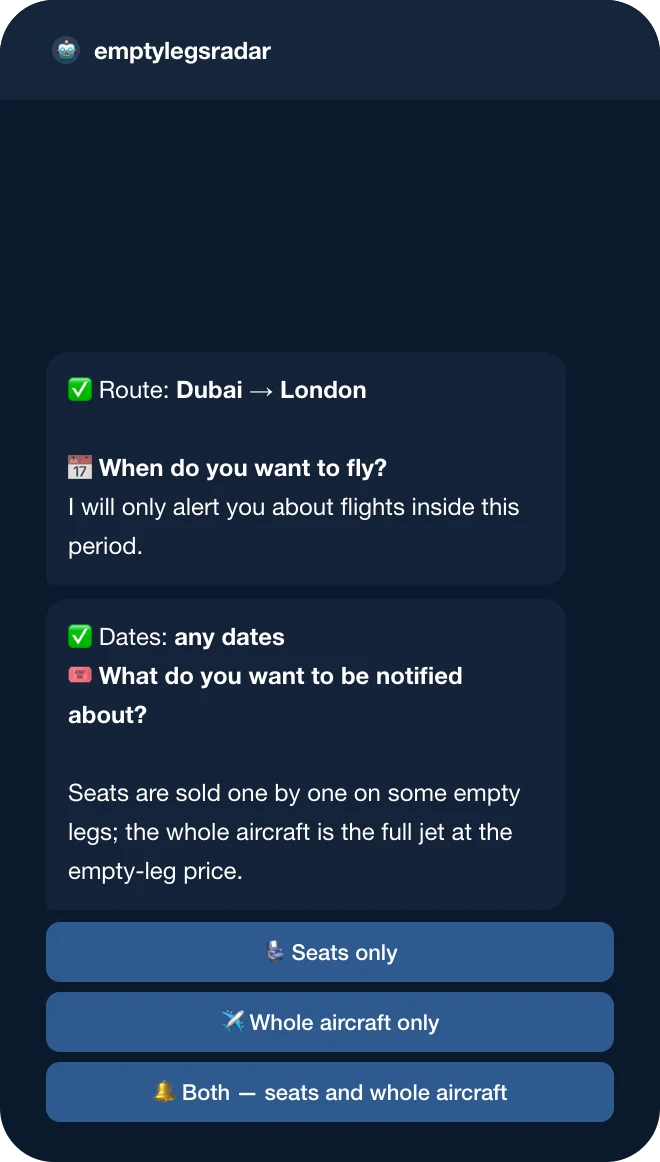
The choice belongs to the route, not to your account. You can track one route for seats and another for the whole aircraft at the same time — for example, a weekend trip for two by the seat and the family holiday as a whole jet.
A flight that is offered both by the seat and as a whole aircraft counts for both kinds of subscription. If an operator sells seats on a jet and also offers the entire aircraft, a "seats only" subscriber and a "whole aircraft only" subscriber both receive it, each with the price that matters to them in bold.
Your routes show the choice
The confirmation message and the /list command now carry the option next to each route: "💺 seats" or "✈️ whole aircraft". Routes set to both have no suffix, which keeps the list short.
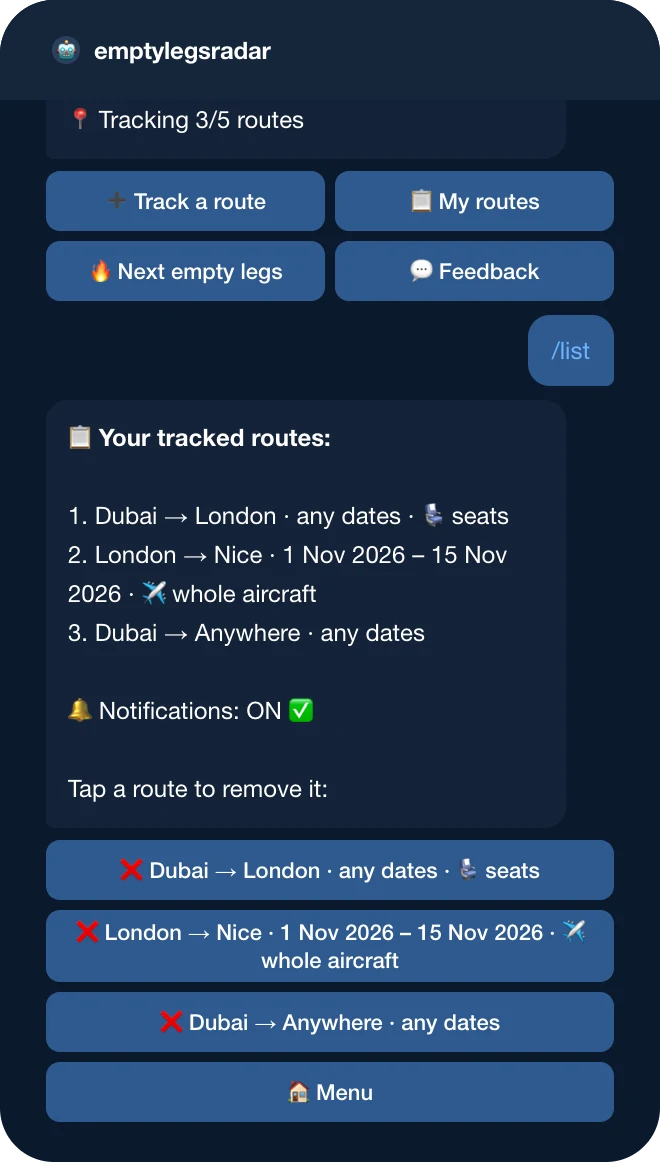
Already tracking a route? Nothing changes until you want it to
Every subscription created before this update keeps working exactly as it did: it sends both seats and whole-aircraft flights. We did not guess anyone's preference.
To switch a route, add it again — the same departure, the same destination, the same dates — and pick the new option at the last step. The bot recognises the route and replaces the old subscription instead of creating a second one, so you will not receive two alerts for the same flight. The reply says "Updated" and shows what the route was set to before.
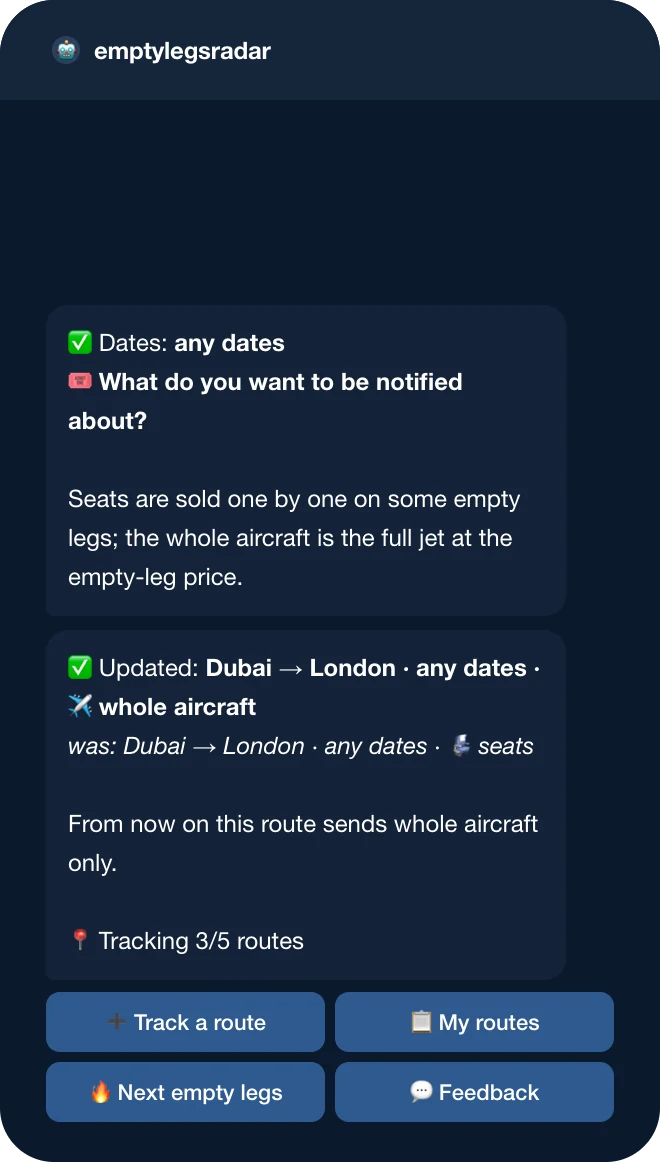
If you add the same route with the same dates and the same option, the bot simply tells you it is already tracking it. Different dates for the same cities are a separate subscription, exactly as before, and the limit of five routes per user is unchanged.
What an alert looks like
Alerts keep their format: both cities, the departure date and local time, the aircraft, the price and a link to request the flight. The first line of the alert now repeats your subscription, including the option, so when you track several variations of one route you can see which one fired.
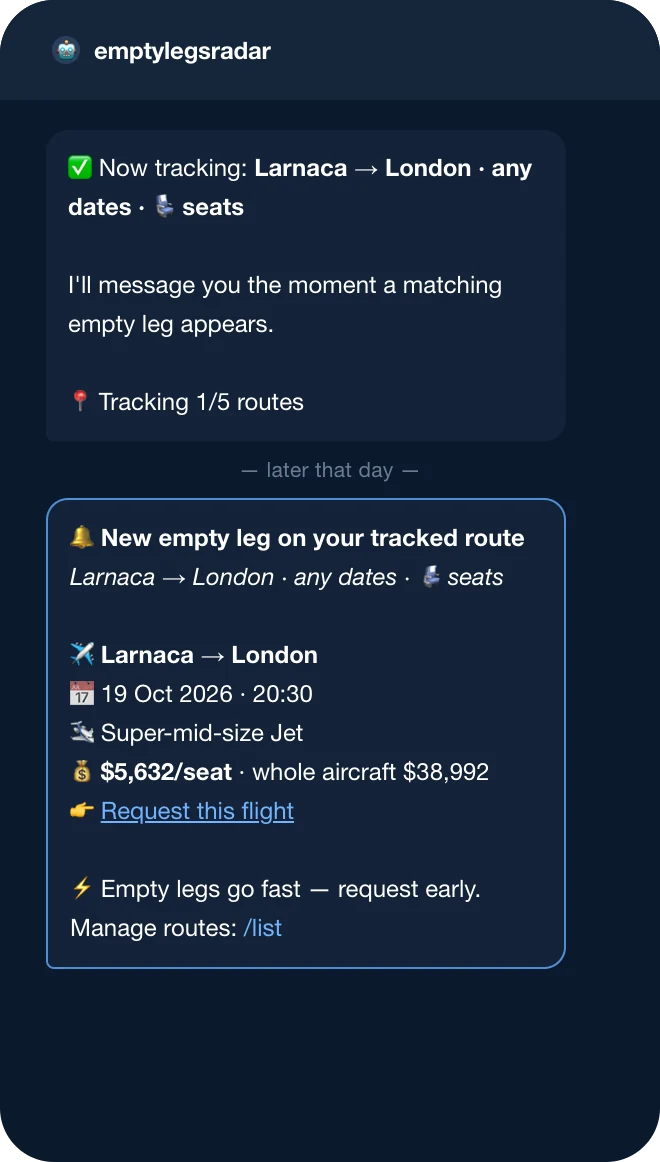
Which option should you choose?
- Travelling alone or as a couple? Seats only. You get the private jet experience at a shared price and skip the alerts about jets you would have to buy outright.
- Family, friends, a team? Whole aircraft only. A seat-by-seat flight rarely has enough seats for a group, and you probably want the cabin to yourselves anyway.
- Not sure, or watching a route out of curiosity? Both. You can always narrow it later by adding the route again.
Whatever you choose, the engine behind the bot is the same: it checks the live operator listings every ten minutes, removes duplicates so one flight means one alert, converts departure times to the airport's local time, and drops flights that are too close to departure to book.
Get started
- Open @emptylegsradar_bot in Telegram and press Start.
- Send
/track, pick your cities and your dates. - Choose Seats only, Whole aircraft only, or Both.
Every new empty leg in the world is still posted publicly in the @emptylegsradar channel, and the current flights are always listed on the empty legs deals page. The product page with all screenshots is at rentjet.eu/emptylegsradar_app.

“The most common reply we got to alerts was 'great flight, but I only need two seats'. Seats and whole aircraft are two different products that happen to share a runway, and a bot that cannot tell them apart is only half useful. This update is small on the screen — one question, three buttons — but it is the difference between an alert you act on and one you scroll past.”
Frequently Asked Questions
Do I need to do anything with the routes I already track?
No. They keep sending both seats and whole-aircraft flights. Change a route only if you want fewer alerts: add it again with the same dates and pick the option you want.
Will I get two alerts for the same flight if I re-add a route?
No. Adding the same route with the same dates replaces the old subscription. The bot also records every alert per flight and per user, so a flight is never sent twice.
What happens to a flight that is sold both by the seat and as a whole aircraft?
It matches both kinds of subscription. A seats-only subscriber and a whole-aircraft-only subscriber both receive it, each with the relevant price highlighted.
Can I set different options for different routes?
Yes. The option belongs to the route. Track one route for seats and another for the whole aircraft at the same time.
Can I change the option without re-adding the route?
Not yet. Re-adding the route with the same dates is the way to switch, and it takes four taps. Removing the old route first is not necessary.
Does the choice affect the @emptylegsradar channel?
No. The channel posts every new empty leg worldwide, however it is sold. The option only filters the private alerts from the bot.
Is the bot still free?
Yes. Tracking and alerts are free for everyone. You only pay if you decide to book a flight.
Pavel Bukreev
Pavel Bukreev is the founder of RentJet and the author of the Empty Legs Radar concept — a Telegram bot that watches private jet repositioning flights for a traveller's exact route and dates. He writes about private aviation from the client's side of the table: what actually works, what is oversold, and how to get the most out of every flight.